Disclaimer
:- This blog is nothing related to
Covid-19 information / guidelines. This is using data provided by ecdc (European Centre for Disease Prevention and Control) for data analysis and data
ploting in graphs in python.
|
First create blob
storage in Azure to use , here in Azure we will save CSV files which receive
from ecdc.
Second register
for Data bricks community edition from
here.
|
Once you have Data
Bricks community edition, create one notebook for python
 |
Now open the
python file.
First command is
to mount the Azure blog Storage where we can save the CSV File.
 Above path /mnt/covid19/ is mount for using at data bricks |
Now download the
Covid19 Data from ecdc site via get request and save it with today's date if
this file already exists then use the same else create a new one.
 |
Now read the CSV
File and do the grouping and filtering
 |
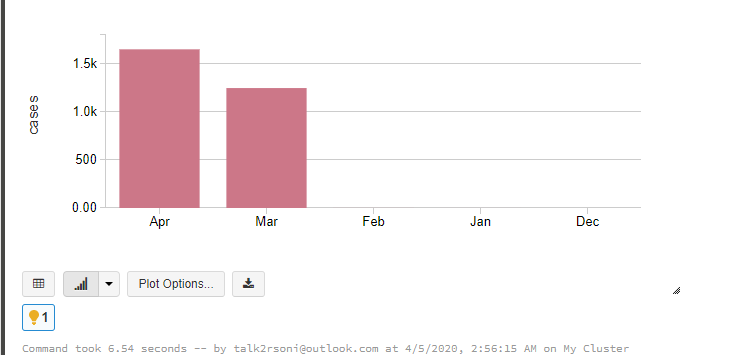
Above will display
the graph like below
 |
Showing posts with label Azure. Show all posts
Showing posts with label Azure. Show all posts
Sunday, April 5, 2020
Data Analysis and graph by PySpark


Monday, March 11, 2019
Service Fabric Deployment via Power shell
Here is the power-shell to deploy Service fabric application.
Just change Service Instances and Application Instances Variable as highlighted below.
Just change Service Instances and Application Instances Variable as highlighted below.
clear$AppPkgPathInImageStore = 'ProcessENTSFApp'$sfApplicationBaseName = 'fabric:/rsoni.ENT.Process.SFApp' $sfApplicationName=''$sfApplicationTypeName ='rsoni.ENT.Process.SFAppType'$sfApplicationTypeVersion='1.0.0'$sfAppServiceTypeName = 'rsoni.ENT.Process.Service.ProcessENTType'$AppFolderPath = 'C:\GitMapping\ENTSolution\rsoni.ENT.Process.SFApp\pkg\Debug'$TotalServiceInstances=5 $TotalApplicationInstances=4#Connect-ServiceFabricCluster @connectArgs#-ConnectionEndpoint $sfURLexit
|
Monday, October 22, 2018
Event Grid vs Event Hubs vs Service Bus
Comparison of services
Service
|
Purpose
|
Type
|
When to use
|
Event Grid
|
Reactive programming
|
Event distribution (discrete)
|
React to status changes
|
Event Hubs
|
Big data pipeline
|
Event streaming (series)
|
Telemetry and distributed data streaming
|
Service Bus
|
High-value enterprise messaging
|
Message
|
Order processing and financial transactions
|
Friday, December 1, 2017
Azure SQL Elastic Pool
Azure SQL Database
is PAAS service, It has Azure SQL Server
and inside this SQL Server we have SQL databases. The costing for SQL Server Database is based
on size and DTU. The Edition (Basic, Standard and Premium) & Pricing Tier
(DTUs) as used for costing.
Database Transaction Units
(DTU)
Microsoft guarantees
a certain level of resources for that database (independent of any other
database in the azure cloud) and providing a predictable level of performance.
This amount of resources is calculated as a number of Database Transaction
Units or DTUs, and is a blended measure of CPU, memory , I/O (data and
transaction log IO).
DTUs are most useful
for understanding the relative amount of resources between Azure SQL Databases
at different performance levels of a database equates to doubling the set of
resource available to that database. For e.g. a premium P11 database with 1750
DTUs provides 350x more DTU Compute power than a basic database with 5 DTUs.
For existing Azure
SQL Database workload, you can use SQL database Query performance insight to
understand your database resource consumption to get deeper insight to
understand your database resource consumption (DTUs). You can also use
sys.dm_db_resource_stats DMV to get the resource consumption information for
the last one hour. Also can use sys.resource_stats for last 14 days.
Elastic Database Transaction
Units (eDTUs)
If there are more
than 1 database and uses of these Database are different then Microsoft has
option to share the resources between these databases. Elastic pool is an
option on SQL Database Server that shares a pool of resources among those
database. The shared resources in an elastic pool measured by elastic Database
Transaction Units or eDTUs.
Powershell to create Elastic pool
Powershell parameters
$Location='Southeast Asia'
$ResourceGroupName='RG'
$SQLServerName='sql-server'
$DBName ='SQLDB1'
$EPoolName='SQLEpool'
$AdminLogin ='XXXXX'
$AdminPassword ='xxxxxxxxx'
$StartIP='219.91.0.0'
$EndIP='219.91.255.255'
First of all login
to Azure subscription
#********** Login to Azure account **********
Login-AzureRmAccount
Select-AzureRmSubscription -SubscriptionName '<<Your
Azure Subscription Name>>'
# Create new Elastic
pool
$EPool = New-AzureRmSqlElasticPool -ResourceGroupName $ResourceGroupName `
-ServerName
$SQLServerName `
-ElasticPoolName
$EPoolName `
-Edition
"Standard" `
-Dtu
50 `
-DatabaseDtuMin
10 `
# Move the database
to the pool
$Database = Set-AzureRmSqlDatabase -ResourceGroupName $ResourceGroupName `
-ServerName
$SQLServerName `
-DatabaseName
$DBName `
-ElasticPoolName
$EPoolName
Subscribe to:
Posts (Atom)